 Phoenix Tax Consultant™ November 11, 2026
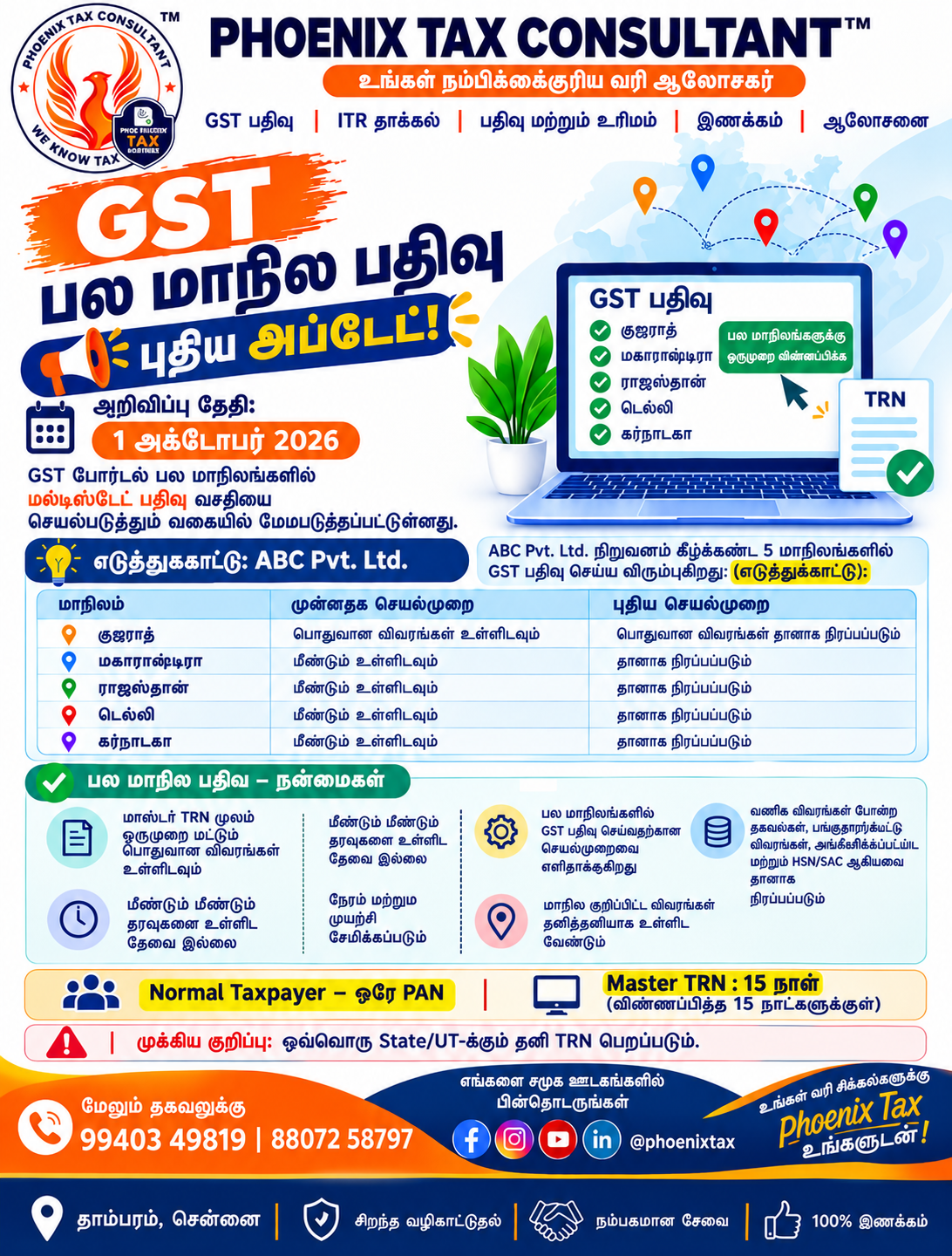
Doing business in more than one State or UT? You no longer need to key in the same business details again and again. On 1 October 2026 GSTN announced a “Multistate Registration” facility on the GST portal (GSTN advisory). This guide explains how it works for businesses in Tambaram, Chennai.
Quick Answer: What is Multistate GST Registration?
Multistate Registration lets a Normal Taxpayer apply for GST registration in several States/UTs at the same time under one PAN. You get a Master TRN, enter the common details once, and each State/UT application is then pre-filled.
விரைவான பதில்: ஒரே PAN-இல், பல State/UT-களில் ஒரே நேரத்தில் GST பதிவுக்கு விண்ணப்பிக்க Normal Taxpayer-க்கு இது உதவுகிறது. Master TRN பெற்று, பொதுவிவரங்களை ஒருமுறை உள்ளிட்டால், ஒவ்வொரு State/UT விண்ணப்பமும் தானாக நிரப்பப்படும்.
Multistate GST Registration at a Glance
| Point | Details |
|---|---|
| Announced by | GSTN advisory dated 1 October 2026 |
| Who can use | Normal Taxpayers, same PAN, more than one State/UT |
| Reference number | Master TRN (use within 15 days) |
| Entered once | Common Registration Information (CRI) |
| Still per State/UT | PPoB, APoB, State-specific details, Aadhaar authentication |
Who Can Use GST Multistate Registration?
- Taxpayers seeking registration in more than one State/UT under the same PAN.
- Currently only Normal Taxpayers.
How Does Multistate GST Registration Work? (Step by Step)
- Open the “Multistate Registration” tab on the homepage of the GST Common Portal and select the States/UTs.
- The portal generates a Master TRN.
- Using the Master TRN, submit the Common Registration Information (CRI): business details, promoter/partner details, authorised signatory, authorised representative, and goods and services. The Master TRN must be used within 15 days.
- After the CRI is submitted, a separate TRN is generated for each selected State/UT, with the common information auto-populated (and still editable).
- For each State/UT, complete the remaining details: Principal Place of Business, Additional Place of Business, State-specific information and Aadhaar authentication.
What Changes for Businesses?
Common details are entered once instead of once per State/UT, which saves time and reduces typing errors. State-specific details and Aadhaar authentication are still needed for every State/UT.
What Should You Keep Ready Before Applying?
Keep ready: PAN, business constitution documents, promoter/partner and signatory details, goods/services list, and address proof for each place of business. Check the final registration status for every State/UT on the portal after submission. See the official GST registration user guide and the GST Council registration flyer.
Need Help with GST Registration in Tambaram, Chennai?
Phoenix Tax Consultant™, West Tambaram, Chennai handles GST registration in Chennai and GST return filing in Tambaram, Chennai. Also read our update on GST amendments from 1 November 2026.
தமிழ்: பல மாநில GST பதிவு – ஒரே Master TRN-ஆல்
ஒரு மாநிலத்துக்கு மேல் வணிகம் செய்கிறீர்களா? இனி ஒவ்வொரு மாநிலத்துக்கும் அதே வணிக விவரங்களை மீண்டும் மீண்டும் உள்ளிட வேண்டியதில்லை. 1 அக்டோபர் 2026 அன்று GSTN, GST போர்டலில் “Multistate Registration” வசதியை அறிவித்துள்ளது (GSTN advisory).
யார் பயன்படுத்தலாம்?
- ஒரே PAN-இல் ஒன்றுக்கு மேல் State/UT-களில் பதிவு செய்ய விரும்புவோர்.
- தற்போது Normal Taxpayers மட்டும்.
படிப்படியான நடைமுறை
- GST Common Portal முக்கியப் பக்கத்தில் “Multistate Registration” tab-ஐத் தேர்வுசெய்து, தேவையான State/UT-களைத் தேர்ந்தெடுக்கவும்.
- Master TRN உருவாகும்.
- Master TRN மூலம் Common Registration Information (CRI): வணிக விவரங்கள், பங்குதாரர்/கூட்டாளி விவரங்கள், அங்கீகரிக்கப்பட்ட கையொப்பதாரர், அங்கீகரிக்கப்பட்ட பிரதிநிதி, பொருட்கள்/சேவைகள். Master TRN-ஐ 15 நாள் காலத்துக்குள் பயன்படுத்த வேண்டும்.
- CRI சமர்ப்பித்தபின், தேர்ந்த ஒவ்வொரு State/UT-க்கும் தனி TRN உருவாகும்; பொதுவிவரங்கள் தானாக நிரப்பப்படும் (திருத்தலாம்).
- ஒவ்வொரு State/UT-க்கும் PPoB, APoB, மாநில குறிப்பிட்ட விவரங்கள், Aadhaar authentication ஆகியவற்றைத் தனித்தனியாகப் பூர்த்தி செய்யவும்.
என்ன மாறும்?
பொதுவிவரங்கள் ஒருமுறை மட்டும் உள்ளிட்டால் போதும்; நேரம் சேமிக்கப்படும், தவறுகள் குறையும். ஆனால் மாநில குறிப்பிட்ட விவரங்களும் Aadhaar authentication-உம் ஒவ்வொரு State/UT-க்கும் தேவை.
விண்ணப்பிக்கும் முன்
PAN, நிறுவன ஆவணங்கள், பங்குதாரர்/கையொப்பதாரர் விவரங்கள், பொருட்கள்/சேவை பட்டியல், ஒவ்வொரு வணிக இடத்தின் முகவரிச் சான்று தயாராக வைக்கவும். சமர்ப்பித்தபின் ஒவ்வொரு State/UT-இலும் பதிவு நிலையைப் போர்டலில் சரிபார்க்கவும்.
FAQs – Multistate GST Registration (English | தமிழ்)
1. What is Multistate Registration on the GST portal? / பல மாநில பதிவு என்றால் என்ன?
A facility to apply for GST registration in multiple States/UTs at the same time under the same PAN.
ஒரே PAN-இல் பல State/UT-களில் ஒரே நேரத்தில் GST பதிவுக்கு விண்ணப்பிக்கும் வசதி.
2. Who can use Multistate Registration? / யார் பயன்படுத்தலாம்?
Taxpayers seeking registration in more than one State/UT under the same PAN.
ஒரே PAN-இல் ஒன்றுக்கு மேல் State/UT-களில் பதிவு செய்ய விரும்புவோர்.
3. Is it open to all taxpayer types? / அனைவருக்கும் உண்டா?
Currently the functionality is available only for Normal Taxpayers.
தற்போது Normal Taxpayers-க்கு மட்டும்.
4. What is a Master TRN? / Master TRN என்றால் என்ன?
The reference number generated after you select the States/UTs; it is used to submit the common registration information.
State/UT-களைத் தேர்வுசெய்தபின் வரும் எண்; இதன் மூலம் பொதுவிவரங்கள் சமர்ப்பிக்கப்படும்.
5. How long do I have to use the Master TRN? / Master TRN-ஐ எவ்வளவு காலத்துக்குள் பயன்படுத்த வேண்டும்?
The Master TRN must be used within 15 days.
15 நாள்களுக்குள்.
6. What is CRI? / CRI என்றால் என்ன?
Common Registration Information: business details, promoter/partner details, authorised signatory, authorised representative, and goods and services.
பொது பதிவு விவரங்கள்: வணிக, பங்குதாரர்/கூட்டாளி, கையொப்பதாரர், பிரதிநிதி, பொருட்கள்/சேவைகள்.
7. What must I still fill for each State/UT? / ஒவ்வொரு State/UT-க்கும் தனியாக என்ன நிரப்ப வேண்டும்?
Principal Place of Business, Additional Place of Business, State-specific information and Aadhaar authentication.
PPoB, APoB, மாநில குறிப்பிட்ட விவரங்கள், Aadhaar authentication.
8. Can auto-filled details be edited? / தானாக நிரம்பிய விவரங்களைத் திருத்தலாமா?
Yes, the auto-populated common information remains editable.
ஆம், திருத்தலாம்.
9. When was Multistate Registration announced? / எப்போது அறிவிக்கப்பட்டது?
In a GSTN advisory dated 1 October 2026.
GSTN அறிவிப்பு, 1 அக்டோபர் 2026.
10. Can Phoenix Tax Consultant™ help with multistate GST registration in Tambaram, Chennai? / Phoenix Tax Consultant™ உதவுமா?
Yes. Phoenix Tax Consultant™, West Tambaram, Chennai helps with GST registration. Call 99403 49819 or 88072 58797.
ஆம். 99403 49819 / 88072 58797 என்ற எண்ணில் அழைக்கவும்.
Need Multistate GST Registration? | பல மாநில GST பதிவு வேண்டுமா?
Phoenix Tax Consultant™ – ISO 9001:2015 Certified, Tambaram, Chennai. Doorstep and online service across Tamil Nadu.
Call 9940349819 | Call 8807258797 | jai@phoenixtax.in
No. 10A, 2nd Floor, Rajendra Building, Duraisamy Pillai Street, West Tambaram, Chennai – 600045
Related services: GST Registration | GST Return Filing | Tax Consultant in Tambaram | Contact Phoenix Tax Consultant™
Official reference: GST Portal – News and Updates | GST Portal – Multistate Registration | CBIC GST
